प्रारंभिक सारांश (Opening Summary)
UP Scholarship Form Fill Up Online 2025-26 के लिए ऑनलाइन फॉर्म scholarship.up.gov.in पर जुलाई से दिसंबर 2025 के बीच भरा जा सकता है। यह गाइड OTR रजिस्ट्रेशन से लेकर कॉलेज वेरिफिकेशन (College Verification) तक की पूरी प्रक्रिया बताती है। यदि आप कोई भी चरण छोड़ते हैं, तो आपका आवेदन खारिज (Reject) हो सकता है। नीचे दिए गए प्रत्येक चरण का ध्यानपूर्वक पालन करें।
महत्वपूर्ण तिथियां और समय-सीमाएं (Important Dates and Deadlines)
यह समझ लें कि हर डेडलाइन के बाद करेक्शन विंडो (Correction Window) का इंतजार करना पड़ता है, जो कभी-कभी खुलती भी नहीं है।
छात्र पंजीकरण की समय-सीमा (Student Registration Timeline)
UP Scholarship पोर्टल पर छात्र पंजीकरण 2 जुलाई 2025 से शुरू होकर श्रेणी (Category) के अनुसार 6 दिसंबर 2025 या 20 दिसंबर 2025 तक चलता है। इस अवधि के बाहर सिस्टम कोई भी नया आवेदन स्वीकार नहीं करता है।
-
समय-सीमा चूकने का परिणाम: यदि आप इस तिथि के बाद फॉर्म सबमिट करने की कोशिश करेंगे, तो पोर्टल स्वचालित रूप से बंद मिलेगा। इसके बाद आपको अगले सत्र (Academic Session) का इंतजार करना पड़ेगा। करेक्शन विंडो केवल पहले से जमा किए गए आवेदनों के संशोधन के लिए होती है, नए पंजीकरण के लिए नहीं।
हार्ड कॉपी जमा करने की अंतिम तिथि (Hard Copy Submission Deadline)
ऑनलाइन फॉर्म सबमिट करने के बाद आपको अपने आवेदन का प्रिंटआउट (Hard Copy) 24 दिसंबर 2025 तक अपने कॉलेज/संस्थान में जमा करना अनिवार्य है। यहाँ कई छात्र गलती करते हैं—वे ऑनलाइन सबमिट करने के बाद मान लेते हैं कि काम पूरा हो गया।
-
अनदेखी करने का परिणाम: हार्ड कॉपी के बिना कॉलेज वेरिफिकेशन नहीं करता है, और बिना वेरिफिकेशन के स्कॉलरशिप स्वीकृत (Approve) नहीं होती। 2023-24 सत्र में 57 लाख से अधिक छात्रों ने रजिस्ट्रेशन कराया था, लेकिन केवल 6.43 लाख आवेदन ही आगे बढ़ पाए—इसका एक बड़ा कारण हार्ड कॉपी जमा न करना था।
पात्रता मापदंड (Eligibility Criteria)
छात्रवृत्ति के लिए श्रेणी-वार आय सीमा (Income Limit) और शैक्षणिक योग्यता दोनों की जांच की जाती है।
श्रेणी-वार आय सीमा (Income Limits by Category)
-
सामान्य (General) और SC/ST श्रेणी: प्री-मैट्रिक (कक्षा 9-10) के लिए वार्षिक पारिवारिक आय सीमा ₹2.5 लाख है।
-
OBC श्रेणी: पारिवारिक आय सीमा ₹2.0 लाख है।
-
पोस्ट-मैट्रिक (Post-Matric) कक्षाओं के लिए भी ऐसी ही सीमाएं लागू होती हैं।
व्यावहारिक सुझाव: आय प्रमाण पत्र (Income Certificate) वर्तमान वित्तीय वर्ष (2025-26) का होना चाहिए। पिछले साल का प्रमाण पत्र अपलोड करने पर सिस्टम आवेदन को स्वतः रद्द (Auto-reject) कर देता है।
शैक्षणिक योग्यता की आवश्यकताएं (Educational Qualification Requirements)
-
प्री-मैट्रिक (Pre-Matric): कक्षा 8 पास होना जरूरी है और कक्षा 9 या 10 में नामांकित (Enrolled) होना चाहिए।
-
पोस्ट-मैट्रिक इंटर (Post-Matric Inter): कक्षा 10 उत्तीर्ण होना चाहिए।
-
पोस्ट-मैट्रिक अन्य (Post-Matric Other than Inter): UG, PG, ITI, डिप्लोमा या PhD पाठ्यक्रमों में प्रवेश होना अनिवार्य है।
ध्यान दें: क्या आपने जांच की है कि आपका संस्थान मान्यता प्राप्त (Recognised) है या नहीं? बिना मान्यता प्राप्त संस्थान के आवेदन खारिज कर दिया जाएगा।
आवश्यक दस्तावेज़ (Required Documents)
प्रत्येक दस्तावेज़ के तय मापदंडों (Specifications) का पालन करना आवश्यक है। थोड़ी सी भी असमानता आवेदन रद्द होने का कारण बन सकती है।
| दस्तावेज़ | विवरण / मापदंड |
| आधार कार्ड | मोबाइल नंबर और बैंक खाते से लिंक होना अनिवार्य है। (साइज़: 50KB से 300KB) |
| मूल निवास प्रमाण पत्र | उत्तर प्रदेश का होना चाहिए, जो तहसीलदार या SDM द्वारा जारी किया गया हो। |
| आय प्रमाण पत्र | वित्तीय वर्ष 2025-26 का ही होना चाहिए। पुराना प्रमाण पत्र मान्य नहीं होगा। |
| जाति प्रमाण पत्र | SC/ST/OBC श्रेणियों के लिए सक्षम अधिकारी द्वारा जारी। |
| पिछली कक्षा की मार्कशीट | पिछली उत्तीर्ण कक्षा की अंकतालिका (जैसे- कक्षा 10 के लिए कक्षा 9 की मार्कशीट)। |
| बैंक पासबुक | पहले पेज की कॉपी (अकाउंट नंबर, IFSC कोड और खाताधारक के नाम के साथ)। आधार से लिंक होना अनिवार्य। |
| पासपोर्ट साइज़ फोटो | 10KB से 50KB, JPG/JPEG प्रारूप (अनुशंसित साइज़: 200×230 पिक्सल)। |
| हस्ताक्षर (Signature) | 10KB से 20KB, JPG/JPEG प्रारूप। |
-
दस्तावेज़ न होने का परिणाम: अपलोड करते समय सिस्टम आपको आगे नहीं बढ़ने देगा। यदि आप बाद में गलत दस्तावेज़ अपलोड करते हैं, तो आपको संशोधन (Correction Window) का इंतजार करना होगा।
वन टाइम रजिस्ट्रेशन प्रक्रिया (One Time Registration – OTR)
OTR के बिना आप UP Scholarship का फॉर्म नहीं भर सकते। यह सबसे पहला और सबसे महत्वपूर्ण चरण है।
OTR क्या है और यह क्यों महत्वपूर्ण है?
OTR का अर्थ One Time Registration है। इसमें आपका मोबाइल नंबर, ईमेल आईडी और बुनियादी व्यक्तिगत विवरण पोर्टल पर सुरक्षित हो जाते हैं। एक बार OTR पूरा हो जाने के बाद, आप हर साल उसी लॉगिन से नवीनीकरण (Renewal) या नया आवेदन (Fresh) कर सकते हैं।
-
OTR छोड़ने का परिणाम: जो छात्र बिना OTR किए सीधे “Fresh Registration” पर क्लिक करते हैं, पोर्टल उन्हें “No OTR found” का एरर दिखाता है। इसके बाद उन्हें वापस जाकर OTR पूरा करना पड़ता है, जिससे 20-30 मिनट का समय बर्बाद होता है।
OTR पूरा करने के चरण (Step-by-Step OTR Process)
-
scholarship.up.gov.in पर जाएं।
-
“Student” सेक्शन में “New Registration” पर क्लिक करें।
-
मोबाइल नंबर और ईमेल दर्ज करें—प्राप्त OTP को सत्यापित (Verify) करें।
-
छात्र का नाम बिल्कुल वैसा ही दर्ज करें जैसा 10वीं की मार्कशीट में दर्ज है।
-
जन्मतिथि (DOB), पिता और माता का नाम दर्ज करें।
-
सबमिट करने के बाद एक रजिस्ट्रेशन आईडी (Registration ID) जनरेट होगी—इसे तुरंत सुरक्षित रख लें।
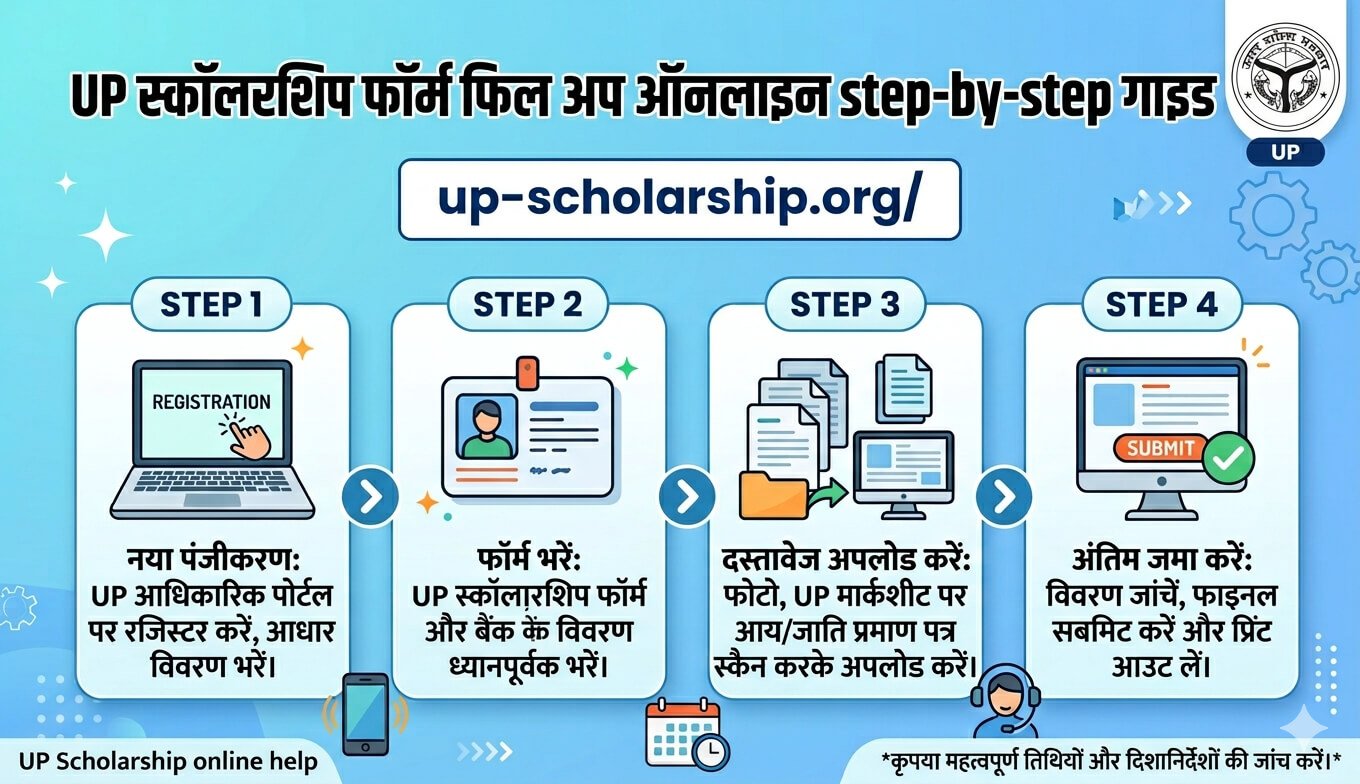
स्टेप-बाय-स्टेप फॉर्म भरने की प्रक्रिया (Step-by-Step Form Fill Up Process)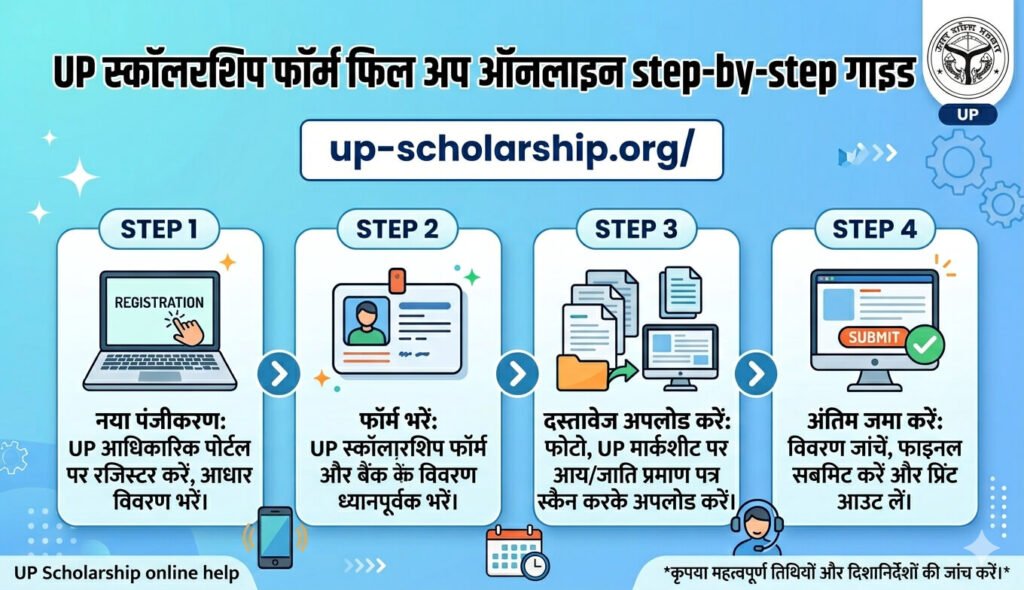
चरण 1 – आधिकारिक पोर्टल पर लॉगिन करें
scholarship.up.gov.in पर जाएं। “Student Login” पर क्लिक करें और OTR के समय बनाए गए क्रेडेंशियल (मोबाइल नंबर और पासवर्ड) दर्ज करके लॉगिन करें।
चरण 2 – आवेदन का प्रकार चुनें (Application Type)
आपको दो विकल्प दिखेंगे: “Fresh Application” और “Renewal Application”।
-
यदि पहली बार आवेदन कर रहे हैं, तो Fresh चुनें।
-
यदि पिछले वर्ष छात्रवृत्ति मिली थी, तो Renewal चुनें।
गलत चुनाव का परिणाम: यदि आप रिन्यूअल छात्र हैं और आपने गलती से Fresh चुन लिया, तो आपकी पिछली आवेदन हिस्ट्री डिलीट हो जाएगी और आपको नए सिरे से सब कुछ भरना पड़ेगा।
चरण 3 – व्यक्तिगत विवरण भरें (Personal Details)
अपना नाम, जन्मतिथि, माता-पिता का नाम और आधार नंबर दर्ज करें। ध्यान रखें कि नाम बिल्कुल 10वीं की मार्कशीट से मेल खाना चाहिए। (यदि आधार और मार्कशीट में नाम अलग है, तो कॉलेज वेरिफिकेशन के समय आवेदन निरस्त कर दिया जाएगा)।
चरण 4 – शैक्षणिक विवरण भरें (Academic Details)
वर्तमान कक्षा, बोर्ड का नाम (UP Board / CBSE / ICSE), पिछले वर्ष के अंक और नामांकन संख्या (Enrollment Number) दर्ज करें। रोल नंबर या एनरोलमेंट नंबर स्कूल/कॉलेज से प्राप्त करें।
चरण 5 – दस्तावेज़ अपलोड करें (Upload Documents)
एक-एक करके सभी आवश्यक दस्तावेज़ अपलोड करें।
व्यावहारिक सुझाव: यदि फोटो अपलोड नहीं हो पा रही है, तो फाइल के नाम से स्पेस हटा दें। उदाहरण के लिए,
photo student.jpgकी जगहphoto.jpgनाम रखें और साइज़ 50KB से कम रखें।
चरण 6 – फाइनल सबमिट से पहले पूर्वावलोकन (Preview)
आवेदन सबमिट करने से पहले “Preview” विकल्प पर क्लिक करें और भरे गए सभी विवरणों (विशेषकर आय प्रमाण पत्र की तिथि और आय की राशि) की जांच कर लें।
चरण 7 – फाइनल सबमिट करें और प्रिंट निकालें
सबमिट पर क्लिक करने के बाद आवेदन क्रमांक (Application Number) जनरेट होगा। इसका प्रिंटआउट निकालकर कम से कम 4 प्रतियां (Copies) अपने पास रख लें (एक कॉलेज के लिए, एक स्वयं के लिए, एक बैंक के लिए और एक बैकअप के रूप में)।
फॉर्म जमा करने के बाद क्या करें? (After Submission Steps)
कॉलेज में हार्ड कॉपी जमा करना
ऑनलाइन फॉर्म सबमिट करने के 24 घंटे के अंदर प्रिंटआउट निकालकर अपने कॉलेज के नोडल अधिकारी या प्रधानाचार्य के पास जमा करें। इसकी अंतिम तिथि 24 दिसंबर 2025 है।
कॉलेज वेरिफिकेशन प्रक्रिया
कॉलेज प्रशासन अपने पोर्टल पर लॉगिन करके आपके दस्तावेज़ों और विवरणों की जांच करता है। कॉलेज से स्वीकृत होने के बाद आवेदन जिला छात्रवृत्ति समिति (District Committee) के पास जाता है।
आम गलतियां और उनके परिणाम (Common Mistakes and Consequences)
| गलती | कारण | परिणाम | समाधान |
| OTR न करना | सीधे “Fresh Registration” पर क्लिक कर देना | “No OTR found” एरर | पहले OTR रजिस्ट्रेशन पूरा करें |
| फोटो अपलोड न होना | फाइल साइज़ अधिक होना या फॉर्मेट गलत होना | फॉर्म आगे नहीं बढ़ेगा | फोटो का साइज़ कंप्रेस करें, JPG प्रारूप चुनें |
| पुराना आय प्रमाण पत्र | पिछले वर्ष का प्रमाण पत्र अपलोड करना | आवेदन स्वतः निरस्त (Auto-reject) | FY 2025-26 का नया प्रमाण पत्र बनवाएं |
| नाम में असमानता | आधार और मार्कशीट में नाम अलग होना | कॉलेज वेरिफिकेशन में निरस्त | करेक्शन विंडो के समय नाम सुधारें |
| हार्ड कॉपी जमा न करना | केवल ऑनलाइन सबमिट करके छोड़ देना | वेरिफिकेशन नहीं होगा | 24 दिसंबर से पहले कॉलेज में प्रिंट जमा करें |
आवेदन की स्थिति और भुगतान (Application Status and Payment)
स्टेटस कैसे चेक करें?
-
scholarship.up.gov.in पर जाएं।
-
“Status” टैब पर क्लिक करें।
-
रजिस्ट्रेशन नंबर और जन्मतिथि दर्ज करके स्टेटस जांचें।
स्टेटस के अर्थ:
-
Pending Verification: कॉलेज या विभागीय स्तर पर जांच चल रही है।
-
Approved / Disbursed: स्कॉलरशिप स्वीकृत हो गई है और राशि बैंक खाते में भेजी जाएगी।
-
Rejected: किसी दस्तावेज़ या पात्रता में कमी के कारण निरस्त।
-
Defective: दस्तावेज़ों में कोई त्रुटि है, इसे करेक्शन विंडो में ठीक करें।
भुगतान की समय-सीमा (Payment Timeline)
सरकारी योजना के अनुसार 24 जनवरी 2026 से फंड ट्रांसफर (DBT के माध्यम से) होना संभावित है। आप PFMS पोर्टल पर “Know Your Payment” विकल्प से भी अपने भुगतान को ट्रैक कर सकते हैं।
अक्सर पूछे जाने वाले प्रश्न (FAQs)
1. क्या मोबाइल से फॉर्म भरा जा सकता है?
हाँ, लेकिन Chrome ब्राउज़र में “Desktop Site” मोड चालू रखें ताकि फोटो व सिग्नेचर अपलोड करने में समस्या न आए।
2. फॉर्म सबमिट करने के बाद संशोधन (Edit) कैसे करें?
करेक्शन विंडो खुलने पर पोर्टल पर जाकर “Edit Application / Correction” विकल्प से विवरण अपडेट करें।
3. छात्रवृत्ति का पैसा कब आता है?
कॉलेज और विभागीय स्वीकृति के बाद DBT के जरिए राशि भेजी जाती है। पूरी प्रक्रिया में आमतौर पर कुछ महीनों का समय लगता है।
4. क्या प्राइवेट कॉलेज के छात्र पात्र हैं?
हाँ, यदि आपका कॉलेज UP शासन द्वारा मान्यता प्राप्त और संबद्ध (Affiliated) है।
5. आय प्रमाण पत्र कहाँ से बनवाएं?
तहसील कार्यालय या e-District पोर्टल (edistrict.up.gov.in) से बनवा सकते हैं।
6. क्या बिना आधार कार्ड के फॉर्म भरा जा सकता है?
नहीं, आधार कार्ड अनिवार्य है और यह मोबाइल व बैंक खाते से लिंक होना चाहिए।
7. “Defective” स्टेटस का क्या मतलब है?
इसका मतलब है कि आपके आवेदन या दस्तावेज़ में कोई त्रुटि पाई गई है, जिसे करेक्शन विंडो में सुधारना होगा।
8. आधिकारिक हेल्पलाइन नंबर क्या है?
UP Scholarship टोल-फ्री हेल्पलाइन नंबर: 1800-180-0009 (कार्यालयीन समय 10 AM से 5 PM तक)।
लेखक की विशेषज्ञता (Author Expertise)
यह गाइड UP Scholarship पोर्टल के आधिकारिक दिशानिर्देशों, सरकारी अधिसूचनाओं और समाज कल्याण विभाग के सर्कुलरों के सटीक विश्लेषण पर आधारित है। (स्रोत: scholarship.up.gov.in)
फाइनल सबमिशन से पहले की चेकलिस्ट (Final Checklist)
-
[ ] क्या OTR पूरा कर लिया है?
-
[ ] क्या आय प्रमाण पत्र वर्तमान सत्र (2025-26) का है?
-
[ ] क्या फोटो और हस्ताक्षर का साइज़ नियमानुसार है?
-
[ ] क्या बैंक खाता आधार कार्ड से लिंक है?
-
[ ] क्या हार्ड कॉपी 24 दिसंबर से पहले कॉलेज में जमा कर दी है?